When people ask me where I start when building an AI solution, my answer is almost always the same: Azure AI Services.
It’s not just because they’re powerful (which they are), but because they’re practical. Microsoft has done a great job of providing ready-to-use APIs and prebuilt models that let you integrate AI capabilities into your applications without reinventing the wheel. And when I need to take things a step further — especially for generative AI or multi-capability AI agents — I turn to Azure AI Foundry to manage, scale, and secure it all in one place.
The Azure AI Services I Keep Coming Back To
Here’s how I’ve personally used some of the most impactful Azure AI services in my projects:
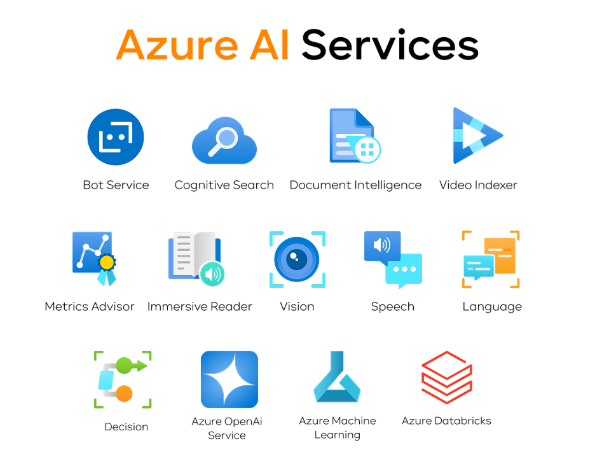
- Azure OpenAI (in Foundry Models) – My favorite for generative AI. I’ve used GPT models for everything from drafting RFP responses to generating knowledge-based answers using company data. Pairing this with Foundry’s orchestration makes it enterprise-ready.
- Azure AI Vision – I once built a proof-of-concept for automated product recognition in a warehouse setting — no barcodes required. The Vision API detected and tagged items straight from camera feeds.
- Azure AI Speech – This is how I turned voice instructions into text commands and even enabled real-time translations during meetings.
- Azure AI Language – Essential for natural language understanding. I’ve used it for sentiment analysis of customer feedback, entity extraction, and summarizing long documents into digestible points.
- Azure AI Foundry Content Safety – In customer-facing apps, I rely on this to flag risky or inappropriate content before it reaches the end user.
- Azure AI Translator – A must-have in global projects. It’s powered multilingual customer service chatbots I’ve built.
- Azure AI Face – I’ve worked with it in restricted access scenarios, like secure check-in flows, where facial verification replaced traditional ID scans.
- Azure AI Custom Vision – Perfect for training industry-specific image classifiers, like identifying different utility meter types for field service crews.
- Azure AI Document Intelligence – This has saved clients countless hours by automatically extracting structured data from invoices, receipts, and forms.
- Azure AI Content Understanding – A powerful multi-modal tool for analyzing forms, images, videos, and audio streams in one pipeline.
- Azure AI Search – My go-to for creating vector indexes and grounding prompts for OpenAI models so the AI responds with context from internal business data, not just generic internet knowledge.
Why I Often Use Foundry Instead of Standalone Services
While many Azure AI services can be deployed as standalone resources (and I sometimes do that for small, focused projects), I’ve found that Azure AI Foundry makes a huge difference for medium to large-scale solutions.
With Foundry:
- I can centralize access control and cost management.
- All my AI services are under one umbrella, making integration smoother.
- It’s easier to share resources across a team without juggling multiple keys and endpoints.
- I can manage both generative AI (Azure OpenAI) and traditional AI services (Vision, Language, Document Intelligence) in one project.
Practical Considerations I’ve Learned the Hard Way
- Regional availability matters – I’ve had projects where certain OpenAI models weren’t available in the client’s preferred Azure region. Always check the availability tables first.
- Pricing can sneak up on you – AI is often billed per transaction or token. I now use the Azure Pricing Calculator before building, so clients know what to expect.
- Start with free tiers – Many services offer a free tier, perfect for prototyping before scaling.
 Dynamics Decoded
Leave a comment