This AI-powered feature is designed to simplify the way businesses handle incoming sales requests, and after exploring it hands-on, I can confidently say—it’s a game-changer for customer service teams, sales operations, and users trying to automate manual processes.
So, What Exactly Is the Sales Order Agent?
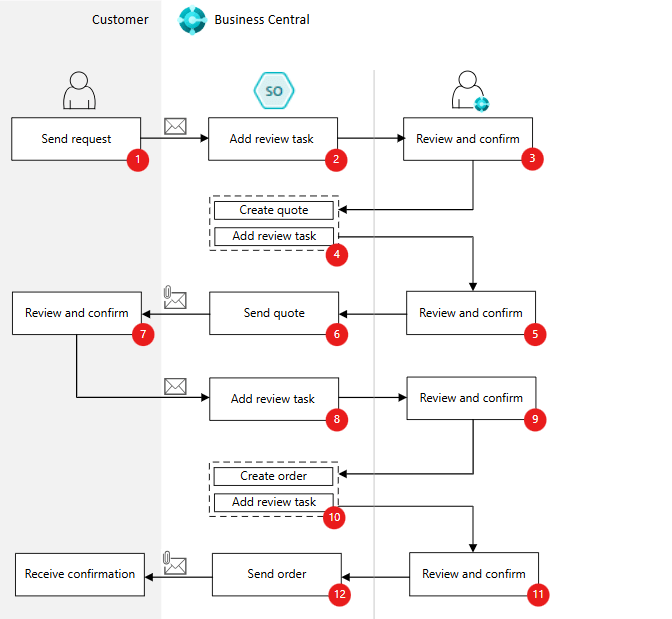
Think of it as your virtual assistant inside Business Central. The agent listens for sales-related emails coming into a designated inbox. It reads those emails, extracts key order details, finds the customer in BC, checks item availability, and even prepares a PDF sales quote—all without manual input. If it needs clarification (like missing quantities or delivery dates), it can carry on an email conversation with the customer to fill in the blanks.
But here’s the kicker: it doesn’t stop there. Once the quote is approved by the user, the agent can convert it into a sales order and send it back to the customer. And all this is done with full visibility and control for the Business Central user.
Why This Matters to End Users and this isn’t just a fancy Copilot buzzword—it directly addresses real-world pain points:
- Time savings: No more flipping between Outlook, Excel, and BC to respond to a basic order request.
- Reduced errors: AI reads and processes email instructions consistently. Less chance of misreading an order.
Not Just Smart—Also Secure
The Sales Order Agent doesn’t operate in the dark. It works within the roles and permissions set by admins. It follows the same access rules that human users do, and any messages it prepares go through an internal review process before being sent out.
This means even though it runs independently in the background, users stay in the loop and are only pulled in when needed. It strikes a nice balance between autonomy and oversight.
Setup Is Straightforward
To activate it, you tell BC what inbox the agent should monitor and specify which users are allowed to manage the process. There’s no major coding required—just configuration. It’s also smart enough to navigate your BC UI using captions, tooltips, and role centers—like a human would.
One More Thing—It’s Adaptive
The agent isn’t hardcoded. It learns and adapts based on the data it sees in your system. So if you’ve customized your item descriptions or added fields, the agent will pick that up. It can even handle vague item requests like “wooden chair” and match it to the right SKU based on attributes and extended text.
What Should You Do Now?
If you’re in Sales, Customer Service, or Operations—keep an eye on this feature. If you’re in IT or an admin—get familiar with setting up the email monitoring and user roles. If you’re a Business Central partner—this is a feature worth demoing.
You can find the official documentation here for Dynamics 365 and here for Power Platform. But don’t just read it—try it.
Final Thoughts
Sales Order Agent is one of those rare features that combines AI innovation with direct, tangible business value. I did try using demo data and some regular sample data and its working great, But I will be doing more testing to see how customization will effect the Sales order agent.
I waiting to see what developers community provide feedback to Sales order agent and how it fit different industry.
 Dynamics Decoded
Leave a comment