Explore End-to-End Analytics with Microsoft Fabric
Scalable analytics shouldn’t be a patchwork of complex tools. Microsoft Fabric makes the journey smoother with a unified platform that brings together everything you need for data analytics in one place. I recently completed the Microsoft Learn module “Explore end-to-end analytics with Microsoft Fabric” and wanted to share a quick personal breakdown of what stood out.
Unified Analytics with OneLake ( I love this picture 🧡)
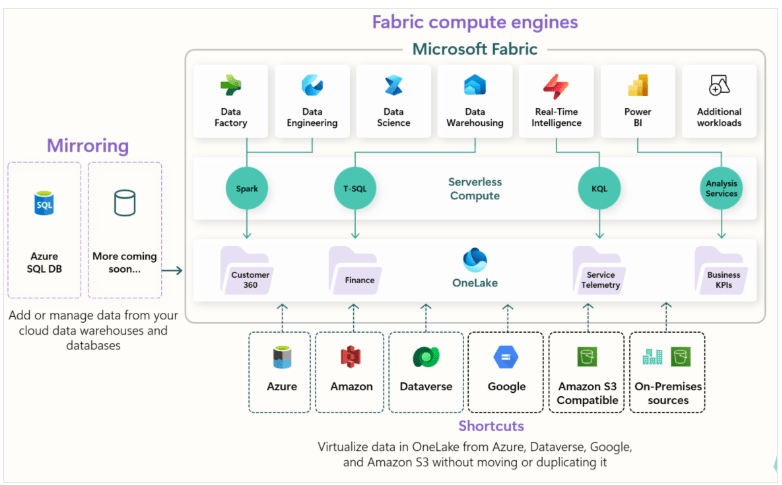
Fabric’s foundation is OneLake – a centralized, open-format storage layer that’s accessible to all compute engines in the platform. Think of it as the OneDrive for your enterprise data.
- No data duplication: All analytics engines write in Delta-Parquet format, so no need to move or replicate data between tools.
- Supports open formats: Delta, Parquet, CSV, and JSON.
- Shortcuts: Link external data sources without copying them, staying in sync with your cloud-native storage.
Workspaces: Your Analytics Command Center
Workspaces in Fabric are like mission control for your data projects.
- Organize datasets, notebooks, pipelines, reports, and dashboards.
- Role-based access for business and IT users.
- Git integration for version control.
- Configure compute resources based on workload needs.
Admin & Governance Without the Headaches
Fabric simplifies administration while keeping governance tight.
- Centralized admin portal to manage groups, data sources, permissions, and performance.
- SDKs and APIs to automate tasks.
- OneLake catalog gives visibility into data sensitivity, refresh status, and metadata.
Why This Matters
I’ve worked across a number of data and ERP platforms, and this approach by Microsoft Fabric is a game-changer. It simplifies collaboration between teams, reduces overhead costs, and speeds up access to insights — all without sacrificing governance or scalability.
If you’re exploring analytics modernization or just want to cut through the noise of disconnected tools, Microsoft Fabric is definitely worth a look.
 Dynamics Decoded
Leave a comment